FAQ
What do you need help with?


Support
Information
Compatibility
Guide
Help
What do you need help with?
From rekordbox for iOS (ver. 4), DJ play is enabled by rotating the mobile device sideways in addition to music management.
Additionally, DJ play is enabled by connecting the supported DJ controller / All-In-One DJ Systems.
You can also download the tracks to CDJ/XDJ by connecting mobile device to CDJ/XDJ with PRO DJ LINK as always.
https://rekordbox.com/en/support/faq/about-ios/#faq-3525
From rekordbox for iOS (ver. 4), iPad is also supported.
https://rekordbox.com/en/support/faq/about-ios/#faq-3526
We ask you to log in with your AlphaTheta account in order to do the following features.
In addition, logging in allow us to collect feedback and information to improve our products.
https://rekordbox.com/en/support/faq/about-ios/#faq-q100082
Libraries from earlier versions of rekordbox for iOS can't be used with rekordbox for iOS (ver. 4). If you're using a PC/Mac, you can convert the library from a version of rekordbox for Mac/Windows earlier than ver. 6 to use with rekordbox for Mac/Windows (ver. 6). Then you can sync it with rekordbox for iOS (ver. 4).
https://rekordbox.com/en/support/faq/about-ios/#faq-3527
The rekordbox for iOS (ver. 4) library can't sync with the one in a version of rekordbox for Mac/Windows earlier than ver. 6. Please use rekordbox for Mac/Windows (ver. 6) to sync a library with rekordbox for iOS (ver. 4).
https://rekordbox.com/en/support/faq/about-ios/#faq-3528
The features marked with a check in the table below are available in Lite Mode.
| Function | Available |
|---|---|
| CUE | - |
| HOT CUE | - |
| MEMORY CUE | - |
| AUTO LOOP | - |
| MANUAL LOOP | - |
| BEAT JUMP | - |
| TEMPO SLIDER | - |
| SLIP | - |
| SYNC | ✔* |
| SMART FADER | ✔* |
| KEY SYNC | - |
| KEYBOARD | - |
| CHANNEL FADER | - |
| CROSSFADER | ✔ |
| TRIM | - |
| EQ | - |
| SAMPLER | ✔ |
| SAMPLER Volume Adjustment | - |
| SAMPLER Customization | - |
| PAD FX | ✔ |
| PAD FX Customization | - |
| BEAT FX | - |
| RELEASE FX | - |
| Recording | - |
| Upload to online storage | - |
*In Lite Mode, these features are permanently fixed to ON.
https://rekordbox.com/en/support/faq/about-ios/#faq-86278
Supported options:
Without an in-app subscription: AAC 64kbps only.
Subscribers have access to all supported audio formats.
The audio format is not changed automatically, so please make sure to set the preferred format before recording.
You can change the audio format from [Settings] > [Recording] > [Sound Quality].
*When using WAV format, the maximum recording time per session is approximately 6 hours.
*When using AAC format, the recording time is unlimited.
https://rekordbox.com/en/support/faq/about-ios/#faq-q100131
Yes. You can record audio when connected to the DDJ-FLX4.
Select [Settings] > [DDJ-FLX4] > [Microphone Input], then [Effect mode].
https://rekordbox.com/en/support/faq/about-ios/#faq-q100130
Follow the steps below to upload the recordings:
https://rekordbox.com/en/support/faq/about-ios/#faq-q100127
Tap the rekordbox button at the top of the screen to open [Menu], then tap the [Recording] button to start recording.
You can view your recordings in [Recording List] in [Menu].
The following actions are available in [Recording List]:
https://rekordbox.com/en/support/faq/about-ios/#faq-q100126
The recording feature allows you to save your DJ performance on rekordbox for iOS/Android as recordings in WAV or AAC format.
This feature can also be used while connected to a supported DJ controller.
With an in-app subscription, you can enjoy unlimited high-quality audio recording. (If you do not have an in-app subscription, recording is limited to 30min/week.)
You can also upload your recordings to Mixcloud and SoundCloud
https://rekordbox.com/en/support/faq/about-ios/#faq-q100125
The same as rekordbox for Mac/Windows.
However, rekordbox for iOS/Android has the following limitations.
https://rekordbox.com/en/support/faq/about-ios/#faq-q100122
Yes.
Open [Settings], select [General], and turn off [Jog Ring Animation].
https://rekordbox.com/en/support/faq/about-ios/#faq-86280
No, in Lite Mode, the BPM of the left and right decks are always synchronized.
https://rekordbox.com/en/support/faq/about-ios/#faq-86276
No, you cannot change the BPM for each deck in Lite mode.
https://rekordbox.com/en/support/faq/about-ios/#faq-86274
Yes.
You can change settings to automatically play tracks as soon as they are loaded into the deck.
Open [Settings], select [General], and turn ON [Auto Play when loaded].
https://rekordbox.com/en/support/faq/about-ios/#faq-86272
No, Lite Mode is not available when a DJ controller / All-In-One DJ Systems is connected.
https://rekordbox.com/en/support/faq/about-ios/#faq-86270
Yes, Lite Mode is available for free.
https://rekordbox.com/en/support/faq/about-ios/#faq-86268

https://rekordbox.com/en/support/faq/about-ios/#faq-86264
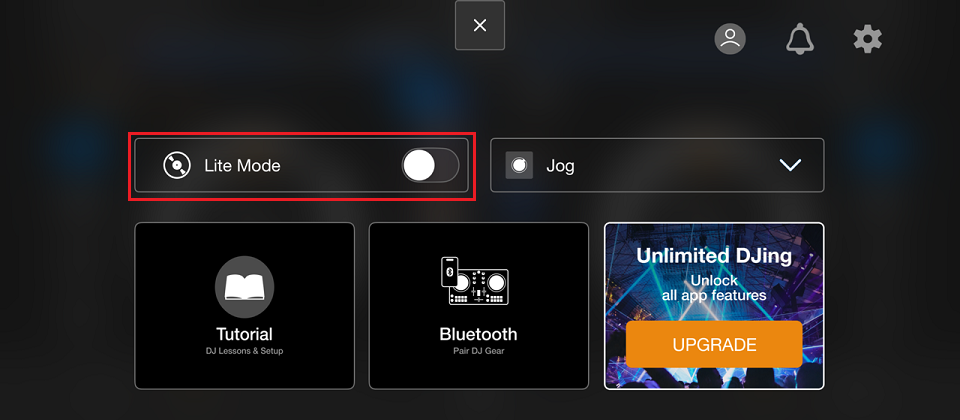
Lite Mode is a simplified mode with limited features, designed for beginners to enjoy DJ playing with intuitive operations.
https://rekordbox.com/en/support/faq/about-ios/#faq-86261
In rekordbox for iOS, enable [Output audio from the iPhone speaker only] or [Output audio from the iPad speaker only] under [Settings] > [Audio].
This allows Master audio to be output from your mobile device's speaker.
However, Master audio will not be output from the DJ controller.
Additionally, the following operations on the DJ controller will be restricted:
https://rekordbox.com/en/support/faq/about-ios/#faq-86290
This is a feature that allows you to enjoy DJ playing easily with low latency without external speakers when connected to a supported DJ controller / All-In-One DJ System via USB cable.
Please enable [Output audio from the iPhone speaker only] or [Output audio from the iPad speaker only] under [Settings] > [Audio].
This allows Master audio to be output from your mobile device's speaker.
However, Master audio will not be output from the DJ controller / All-In-One DJ System.
Additionally, the following operations on the DJ controller / All-In-One DJ System will be restricted:
Compatible DJ controllers / All-In-One DJ Systems:
https://rekordbox.com/en/support/faq/about-ios/#faq-86288
Establish a connection via Bluetooth.
Some DJ controllers and iOS devices with Lightning terminals may not communicate even if connected via USB.
*For details, refer to your DJ Controller Instruction Manual.
https://rekordbox.com/en/support/faq/about-ios/#faq-q100083