FAQ
What do you need help with?


Support
Information
Compatibility
Guide
Help
What do you need help with?
You can confirm the contents on the rekordbox ver. 6 screen.
* You can confirm in the same way when using the XDJ-AZ, OPUS-QUAD, or OMNIS-DUO.
Procedure for checking USB storage device content browseable on the CDJ-3000X
https://rekordbox.com/en/support/faq/devicelibraryplus-6/#faq-q670039
The CDJ-3000X can browse tracks and playlists on a USB storage device only if OneLibrary (formerly Device Library Plus) has been exported to that device.
Follow the steps below to export OneLibrary.
Note: If you are using XDJ-AZ, OPUS-QUAD, or OMNIS-DUO, export OneLibrary using the same procedure as for the CDJ-3000X.
OneLibrary Export Procedure
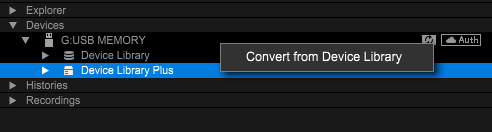
This operation exports a OneLibrary with the same content as the existing Device Library to the USB storage device.
After that, you will be able to browse tracks and playlists on the CDJ-3000X just as you can on other players.
From then on, whenever you export tracks or playlists to a USB storage device, the files will be automatically added to both the existing Device Library and the OneLibrary.
Caution: If you convert when OneLibrary already exists on the USB storage device, it will be overwritten. As a result, any playlists or playback histories stored only in OneLibrary will be lost.
For more details, please refer to the "USB Export Guide".
https://rekordbox.com/en/support/faq/devicelibraryplus-6/#faq-q60700038
This is a new library format created by rekordbox on the USB storage device (or SD card).
DJ equipment supports traditional Device Library formats or the new Device Library Plus formats.
https://rekordbox.com/en/support/faq/devicelibraryplus-6/#faq-q600193
Yes, you can.
You can convert the traditional Device Library in the USB memory to the Device Library Plus format with rekordbox for Mac/Windows.


See the "Device Library Plus User’s Guide" for more details.
https://rekordbox.com/en/support/faq/devicelibraryplus-6/#faq-q600170
See here for the supported DJ equipment.
https://rekordbox.com/en/support/faq/devicelibraryplus-6/#faq-52580
Yes, you can.
You can use them in the same way on each DJ equipment since tracks and playlists are reflected on both libraries when exported to devices.

https://rekordbox.com/en/support/faq/devicelibraryplus-6/#faq-54573
Deleting a playlist or track is reflected only on the library for which the control is performed. Perform deletion controls on both of the libraries.

https://rekordbox.com/en/support/faq/devicelibraryplus-6/#faq-54592
There may be differences between the playlist and Histories of the two libraries.
You can synchronize two libraries with rekordbox for Mac/Windows.
See the "Device Library Plus User’s Guide" for more details.
https://rekordbox.com/en/support/faq/devicelibraryplus-6/#faq-54477
There may be differences between the playlist and Histories of the two libraries.
You can synchronize two libraries with rekordbox for Mac/Windows.
See the "Device Library Plus User’s Guide" for more details.
https://rekordbox.com/en/support/faq/devicelibraryplus-6/#faq-54433
There may be differences between the playlist and Histories of the two libraries.
You can synchronize two libraries with rekordbox for Mac/Windows.
See the "Device Library Plus User’s Guide" for more details.
https://rekordbox.com/en/support/faq/devicelibraryplus-6/#faq-q600194
If playlists are created or edited on [Devices] of the tree view, these changes are only reflected on the playlists in the library for which the controls had been performed.

The following control methods are recommended for device playlist editing.
First, edit the playlist on [Playlists] of [Collection].
You can reflect the playlist edits to both libraries by exporting to the device afterward.
To synchronize Device Library Plus and Device Library playlists from the state in which they are different, see the "Device Library Plus User’s Guide" for more details.
https://rekordbox.com/en/support/faq/devicelibraryplus-6/#faq-52622
No, there aren't.
In the same way as before, you have access to LINK EXPORT.
https://rekordbox.com/en/support/faq/devicelibraryplus-6/#faq-54368