FAQ
What do you need help with?


Support
Information
Compatibility
Guide
Help
What do you need help with?
This is a new library format created by rekordbox on the USB storage device (or SD card).
DJ equipment supports traditional Device Library formats or the new OneLibrary formats.
https://rekordbox.com/en/support/faq/onelibrary-7/#faq-q700030
See here for the supported DJ equipment.
https://rekordbox.com/en/support/faq/onelibrary-7/#faq-89282
You can confirm the contents on the rekordbox ver. 7 screen.
* You can confirm in the same way when using the XDJ-AZ, OPUS-QUAD, or OMNIS-DUO.
Procedure for checking USB storage device content browseable on the CDJ-3000X
https://rekordbox.com/en/support/faq/onelibrary-7/#faq-q700039
The CDJ-3000X can browse tracks and playlists on a USB storage device only if OneLibrary (formerly Device Library Plus) has been exported to that device.
Follow the steps below to export OneLibrary.
Note: If you are using XDJ-AZ, OPUS-QUAD, or OMNIS-DUO, export OneLibrary using the same procedure as for the CDJ-3000X.
OneLibrary Export Procedure
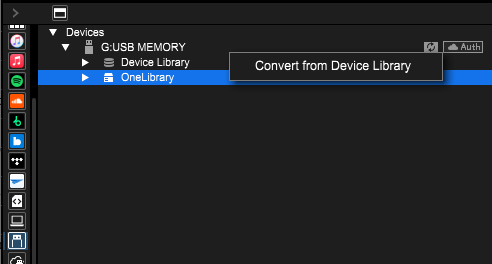
This operation exports a OneLibrary with the same content as the existing Device Library to the USB storage device.
After that, you will be able to browse tracks and playlists on the CDJ-3000X just as you can on other players.
From then on, whenever you export tracks or playlists to a USB storage device, the files will be automatically added to both the existing Device Library and the OneLibrary.
Caution: If you convert when OneLibrary already exists on the USB storage device, it will be overwritten. As a result, any playlists or playback histories stored only in OneLibrary will be lost.
For more details, please refer to the "USB Export Guide".
https://rekordbox.com/en/support/faq/onelibrary-7/#faq-q700038
Yes, you can.
You can convert the traditional Device Library in the USB storage device to the OneLibrary format with rekordbox for Mac/Windows.
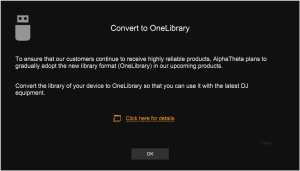
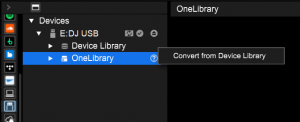
See the "USB Export Guide" for more details.
https://rekordbox.com/en/support/faq/onelibrary-7/#faq-89337
There may be differences between the playlist and Histories of the 2 libraries.
You can synchronize 2 libraries with rekordbox for Mac/Windows.
See the "USB Export Guide" for more details.
https://rekordbox.com/en/support/faq/onelibrary-7/#faq-89314
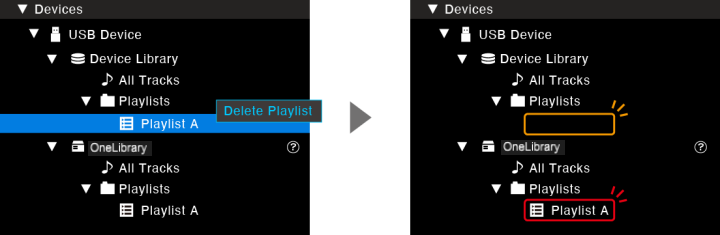
Deleting a playlist or track is reflected only on the library for which the control is performed. Perform deletion controls on both of the libraries.
https://rekordbox.com/en/support/faq/onelibrary-7/#faq-89312
There may be differences between the playlist and Histories of the 2 libraries.
You can synchronize 2 libraries with rekordbox for Mac/Windows.
See the "USB Export Guide" for more details.
https://rekordbox.com/en/support/faq/onelibrary-7/#faq-89286
No, there aren't.
In the same way as before, you have access to LINK EXPORT.
https://rekordbox.com/en/support/faq/onelibrary-7/#faq-89284
There may be differences between the playlist and Histories of the 2 libraries.
You can synchronize 2 libraries with rekordbox for Mac/Windows.
See the "USB Export Guide" for more details.
https://rekordbox.com/en/support/faq/onelibrary-7/#faq-q700031